
티스토리 뷰
1. Chain이란?
: jQuery의 메소드들은 반환값으로 자기 자신을 반환해야 한다는 규칙을 가지고 있다. 이를 이용하면 한번 선택한 대상에 대해서 연속적인 제어를 할 수 있다.
- 예제1.jQuery를 이용해서 코딩하는 경우
<!DOCTYPE html>
<html>
<head>
<meta charset="UTF-8">
<title>Chain 예제1.jQuery를 이용해서 코딩하는 경우</title>
</head>
<body>
	<a id="tutorial" href="http://jquery.com" target="_self">jQuery</a>
	<script type="text/javascript" src="https://ajax.googleapis.com/ajax/libs/jquery/1.6.2/jquery.min.js"></script>
	<script type="text/javascript">
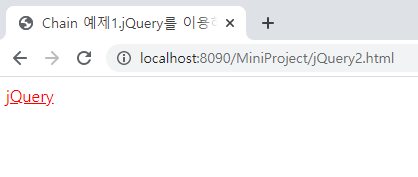
	    jQuery('#tutorial').attr('href', 'http://jquery.org').attr('target', '_blank').css('color', 'red');
	</script>
</body>
</html>
- 예제2.javascript의 DOM을 이용해서 코딩하는 경우
<!DOCTYPE html>
<html>
<head>
<meta charset="UTF-8">
<title>Chain 예제2.javascript의 DOM을 이용해서 코딩하는 경우</title>
</head>
<body>
	<a id="tutorial" href="http://jquery.com" target="_self">jQuery</a>
	<script type="text/javascript">
		var tutorial = document.getElementById('tutorial');
		tutorial.setAttribute('href', 'http://jquery.org');
		tutorial.setAttribute('target', '_blank');
		tutorial.style.color = 'red';
	</script>
</body>
</html><실행결과>
2. chain의 장점
- 코드가 간결해진다.
- 인간의 언어와 유사해서 사고의 자연스러운 과정과 일치함.
3. 탐색(traversing)
- chain의 대상을 바꿔서 체인을 계속 연장시킬 수 있는 방법
- http://api.jquery.com/category/traversing/
Traversing | jQuery API Documentation
Create a new jQuery object with elements added to the set of matched elements. Add the previous set of elements on the stack to the current set, optionally filtered by a selector. Add the previous set of elements on the stack to the current set. Get the ch
api.jquery.com
- 너무 복잡한 chain은 코드의 가독성을 떨어 뜨릴 수 있다.
- 예제3. traversing을 이용해서 chain안에서 대상을 움직일 수 있다.
<!DOCTYPE html>
<html>
<head>
<meta charset="UTF-8">
<title>Chain 예제3.traversing을 이용해서 chain안에서 대상을 움직일 수 있다.</title>
</head>
<body>
	<ul class="first">
		<li class="foo">list item 1</li>
		<li>list item 2</li>
		<li class="bar">list item 3</li>
	</ul>
	<ul class="seconde">
		<li class="foo">list item 1</li>
		<li>list item 2</li>
		<li class="bar">list item 3</li>
	</ul>
	<script type="text/javascript" src="https://ajax.googleapis.com/ajax/libs/jquery/1.6.2/jquery.min.js"></script>
	<script type="text/javascript">
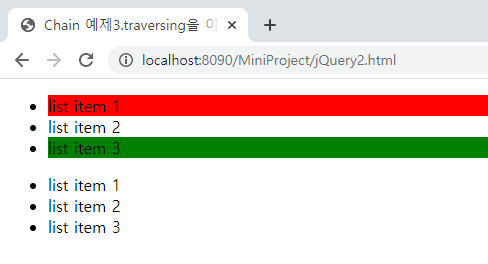
		$('ul.first').find('.foo').css('background-color','red').end().find('.bar').css('background-color', 'green');
	</script>
</body>
</html><실행결과>
=> jQuery API 참고하여 메소드 파악할 것!
'Web > JavaScript jQuery' 카테고리의 다른 글
| [jQuery] 엘리먼트의 제어 (0) | 2020.01.08 |
|---|---|
| [jQuery] event (0) | 2020.01.07 |
| [jQuery] 선택자 (0) | 2020.01.06 |
| [jQuery] wrapper (0) | 2020.01.06 |
| [jQuery] jQuery란? (0) | 2020.01.02 |