
티스토리 뷰
1. 엘리먼트 제어
- jQuery는 엘리먼트를 제어하는 일관되고 풍부한 기능들을 제공한다.
- http://api.jquery.com/category/manipulation/
Manipulation | jQuery API Documentation
Adds the specified class(es) to each element in the set of matched elements. Insert content, specified by the parameter, after each element in the set of matched elements. Insert content, specified by the parameter, to the end of each element in the set of
api.jquery.com
2. 예제
- 자식으로 삽입(.append())
<!DOCTYPE html>
<html>
<head>
<meta charset="UTF-8">
<title>자식으로 삽입(.append())</title>
	<style>
		p{
			background:yellow;
		}
	</style>
	<script src="http://code.jquery.com/jquery-latest.js"></script>
</head>
<body>
	<p>
		I would like to say:
	</p>
	<script>
		$("p").append("<strong>Hello</strong>");
	</script>
</body>
</html>
더보기
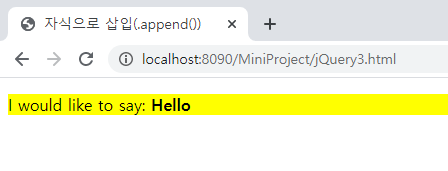
<실행결과>
- 형제로 삽입(.after())
<!DOCTYPE html>
<html>
<head>
<meta charset="UTF-8">
<title>형제로 삽입(.after())</title>
	<style>
		p{
			background:yellow;
		}
	</style>
	<script src="http://code.jquery.com/jquery-latest.js"></script>
</head>
<body>
	<p>
		I would like to say:
	</p>
	<script>
		$("p").after("<b>Hello</b>");
	</script>
</body>
</html>
더보기

<실행결과>
- 부모로 감싸기(.wrap())
<!DOCTYPE html>
<html>
<head>
<meta charset="UTF-8">
<title>부모로 감싸기(.wrap())</title>
	<style>
		div {
			border:2px blue solid;
			margin:2px;
			padding:2px;
		}
		p{
			background:yellow;
			margin:2px;
			padding:2px;
		}
		strong{
			color:red;
		}
	</style>
	<script src="http://code.jquery.com/jquery-latest.js"></script>
</head>
<body>
	<span>Span Text</span>
	<strong>What about me?</strong>
	<span>Another One</span>
	<script>
		$("span").wrap("<div><div><p><em><b></b></em></p></div></div>");
	</script>
</body>
</html>
더보기
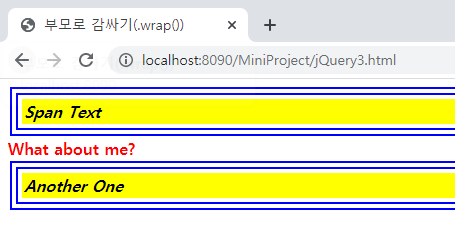
<실행결과>
-삭제(.remove())
<!DOCTYPE html>
<html>
<head>
<meta charset="UTF-8">
<title>삭제(.remove())</title>
	<style>
		p{
			background:yellow;
			margin:6px 0;
		}
	</style>
	<script src="http://code.jquery.com/jquery-latest.js"></script>
</head>
<body>
	<p>
		Hello
	</p>
	<p>
		you?
	</p>
	<button>
		Call remove() on paragraphs
	</button>
	<script>
		$("button").click(function(){
			$("p").remove();
		});
	</script>
</body>
</html>
더보기

<실행결과>
- 치환(.replaceAll())
<!DOCTYPE html>
<html>
<head>
<meta charset="UTF-8">
<title>치환(.replaceAll())</title>
	<script src="http://code.jquery.com/jquery-latest.js"></script>
</head>
<body>
	<p>Hello</p>
	<p>cruel</p>
	<p>World</p>
	<script>
		$("<b>Paragraph.<b>").replaceAll("p");
	</script>
</body>
</html>
더보기
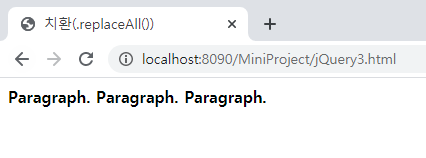
<실행결과>
- 클래스(.toggleClass())
<!DOCTYPE html>
<html>
<head>
<meta charset="UTF-8">
<title>클래스(.toggleClass())</title>
	<style>
		p{
			margin: 4px;
			font-size: 16px;
			font-weight: bolder;
			cursor:pointer;
		}
		.blue{
			color:blue;
		}
		.highlight{
			background:yellow;
		}
	</style>
	<script src="http://code.jquery.com/jquery-latest.js"></script>
</head>
<body>
	<p class="blue">Click to toggle</p>
	<p class="blue highlight">highlight</p>
	<p class="blue">on these</p>
	<p class="blue">paragraphs</p>
	<script>
		$("p").click(function(){
			$(this).toggleClass("highlight");
		});
	</script>
</body>
</html>
더보기
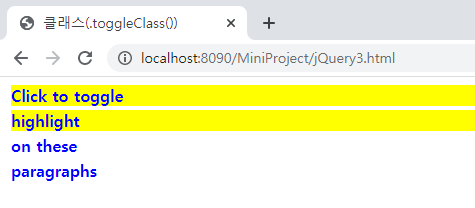
<실행결과>
'Web > JavaScript jQuery' 카테고리의 다른 글
| [JavaScript] 모듈, UI, API (0) | 2020.01.14 |
|---|---|
| [jQuery] 폼 (0) | 2020.01.09 |
| [jQuery] event (0) | 2020.01.07 |
| [jQuery] chain (0) | 2020.01.07 |
| [jQuery] 선택자 (0) | 2020.01.06 |